

Per tutti gli amanti del cioccolato, una lezione che mostra come creare un effetto di testo a forma di deliziosa barretta di cioccolato in Illustrator. Si utilizzerà lo strumento Blend, effetti come Contorni frastagliati e Chrome, diversi metodi di fusione e anche il 3D Estrusione e smusso effetto per creare perfetti quadrati di cioccolato.
Related Posts
31
Oct2013
Create Light Shining Through a Fence in Photoshop
Replicare la bellezza della natura è sempre complicato. Nel tutorial che vedremo imparerete come creare un cielo illuminato dal sole, un vecchio recinto arrugginito con un paio di viti tortuose…
11
Feb2014

Create Luxury Golden Text Effect in Photoshop
L’esercizio che andremo a vedere è un altro bel tutorial sull’utilizzo degli stili di livello in Photoshop per creare un testo di ‘lusso’ con un effetto d’oro. Una bella composizione…
17
Dec2012
Design a Mystical Golden Sphere in Photoshop
In the tutorial we will follow the steps to create this beautiful golden Mystic Sphere in Adobe Photoshop. The steps are quite simple and the result looks great, in my…
05
Mar2015
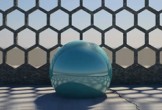
Creating a Hexagon Grid an Rendering in Maya
This video tutorial shows you how to create hexagonal grids for any type of 3d scene in Maya. We will use the Hexagon Grid Creator script. This exercise also provides…
29
Jun2013
Create a Vector Tape Measure in Illustrator
Nel tutorial che andremo a vedere imparerete come creare un metro a nastro vettoriale. Imparare ad usare perfette tecniche di costruzione di forma, spezzare le forme e utilizzare strumenti come…
03
May2013
Skin Modifier in Blender 2.64 – Tutorial
This video lesson is about the skin modifier which is new in Blender 2.64, it has been added. The skin modifier can also be used to easily create base-mesh for…
